How payment works
Your coordinator confirms what is included and the price in writing before anything is booked. Nothing is charged until you say yes. On the day:
Your Buddy arrives
They greet you and show their Guardian24 ID, matching the name and photo we sent.
You pay by secure link
The agreed amount, by the secure payment link we send. If the link does not work, our UPI QR code.
You get a visit start code
Once your payment is received, by message and in your account.
You share it in person
Only with your assigned Buddy. It is not a bank OTP: never share one of those.
Your visit starts
Anything extra is agreed with you first and added to your invoice afterwards, with receipts.
After the visit you receive a summary and your invoice, with receipts. Any extra time or expenses you approved are added and paid by a second secure link.
Your invoice
What you pay for
Only what you agreed. If something new comes up during a visit, your Buddy asks you first.
- Buddy timeThe agreed visit, and any extra time you asked for.
- TravelOnly when it was part of your estimate.
- Expenses you approvedMedicines, tests or tickets paid for you, with the receipts.
- TaxesShown separately, where they apply.
Ways to pay
- UPI
- Debit and credit cards
- Net banking
On the secure page your payment link opens. Payments are processed by our payment gateway, Razorpay or Cashfree, and your card and bank details go to them, never to us. If the link is not working, pay by UPI with our QR code.
If the payment link is not working
Pay by UPI instead
Use this only when the secure payment link we send does not work, so that nothing is paid twice.
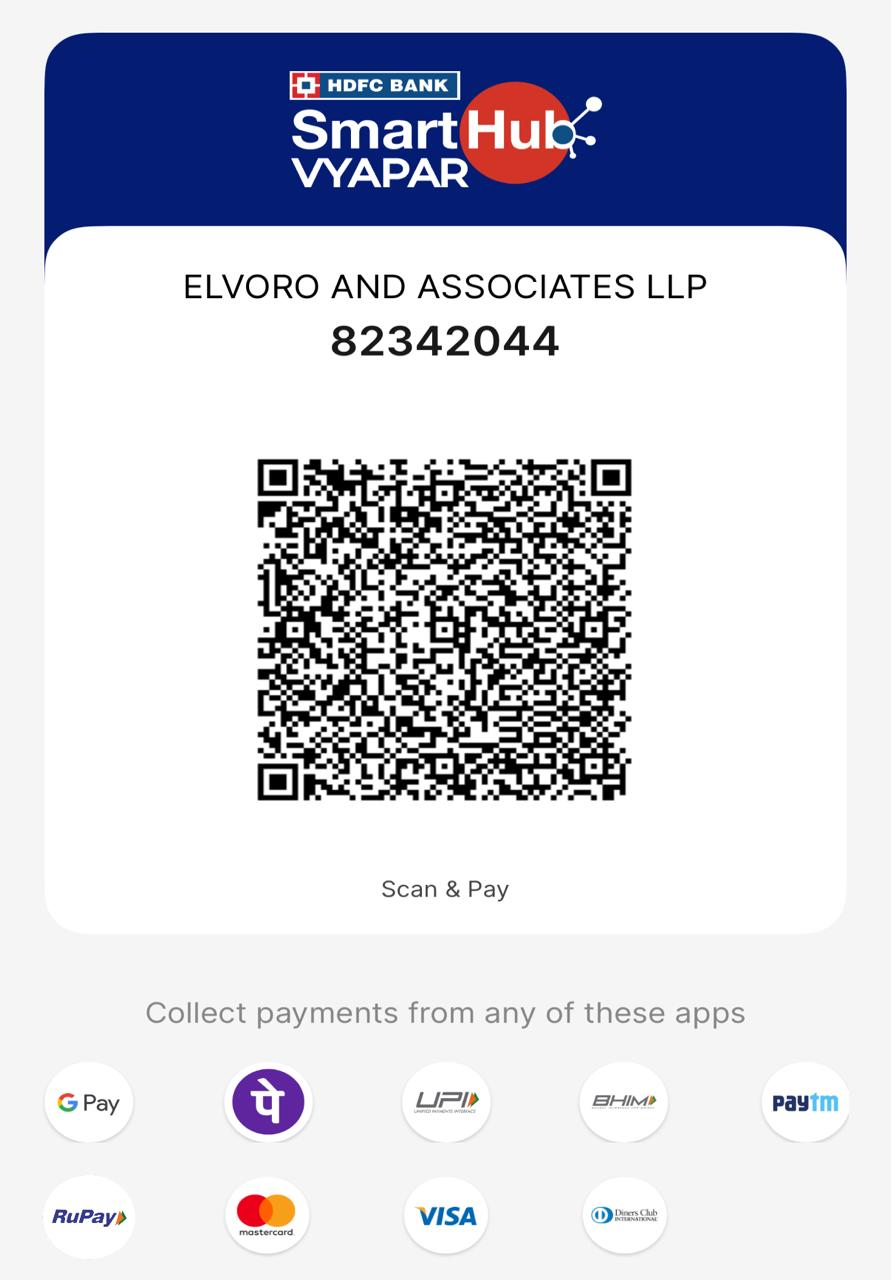
Pay to
ELVORO AND ASSOCIATES LLP
Elvoro & Associates LLP, the company that runs Guardian24 Care Buddies
- Scan the QR code with any UPI app (Google Pay, PhonePe, Paytm, BHIM or your bank’s app). Paying from this phone? Save the QR image, then choose “Scan from gallery” or “Upload QR” in your UPI app.
- Check that the name shown is ELVORO AND ASSOCIATES LLP before you pay.
- Enter the exact amount you agreed, or the amount on your invoice, and add your invoice number in the note.
- Send us the UPI transaction ID (UTR) and your invoice number by WhatsApp or email.
Paying at the start of a visit? Send us the transaction ID straight away; once your coordinator confirms the payment, you get your visit start code to share with your Buddy. For an invoice, we confirm the payment once it reaches our bank account, usually within one working day, and send your receipt. Send the details on WhatsApp or email info@elvoro-systems.com.
Our payment policy
- Your booked service. Your Buddy reaches you, greets you and introduces themselves. You pay the agreed amount by the secure payment link we send (or our UPI QR code if the link is not working). Once your payment is received, you get a visit start code: share it with your Buddy, and only with your assigned Buddy, to start the service.
- Anything extra. Any additional service outside your original booking must be agreed with you, including the cost, before it goes ahead.
- Paying your Buddy directly. If you make a payment directly to your Care Buddy for an approved additional service or expense, always ask for a receipt showing the amount, date and purpose. If you do not receive one, please contact your coordinator.
- Receipts. Ask for a receipt for every payment.
- Never. Never share banking passwords, PINs or payment OTPs, and never pay for anything you have not agreed. Check any unexpected payment request with your coordinator.
Paying safely
Pay for your booking only through the secure payment link we send or the UPI QR code on this page, and check the name shown is ELVORO AND ASSOCIATES LLP. If anyone sends you a different UPI ID or QR code, don’t pay. You never need your UPI PIN to receive money, and our team will never ask for your card number, UPI PIN or OTP. For an approved extra paid to your Buddy directly, ask for a receipt. A payment request only ever comes for something you agreed. If anything looks wrong, don’t pay: email info@elvoro-systems.com and we will check it for you.
Questions about a payment or invoice?
Links that do not work, refunds, receipts and the visit start code are answered in Help.